Batch File Renamer
Batch File Renamer - Batch modify file names

Built for real workflows
Batch File Renamer follows the same principles as every Ahuange tool — small, private and dependable.
Lightweight
Small, focused and fast. No bloat, no trackers — just the job done, right on your computer.
Privacy First
Everything runs locally by default. Your data never leaves your device — no servers, no tracking.
Multi-Step Naming Rules
Chain up to five step types — add content, find & replace, change case, remove characters and replace source — into one repeatable rename pipeline.
Live Preview & Conflict Detection
Preview every rename as you type, with name-conflict and invalid-name warnings long before anything touches your disk.
Two-Phase Safe Rename
Renames run through unique temporary names, so swaps and chains work — and an existing file is never overwritten.
Batch Undo & History
One click rolls back the last batch; the last 20 batches are kept and remain available after restarts.
Streaming Scan for Large Folders
Files appear as they are scanned — handle tens of thousands of entries without staring at a blank window.
Long Path Support
Paths beyond 260 characters are handled automatically with the \\?\ mechanism — deep folder trees no longer fail.
Seven UI Languages
English, Chinese, German, Japanese, French, Spanish and Portuguese — switch anytime, no restart needed.
See it in action
A quick look at the Batch File Renamer interface. Click any screenshot to zoom in.
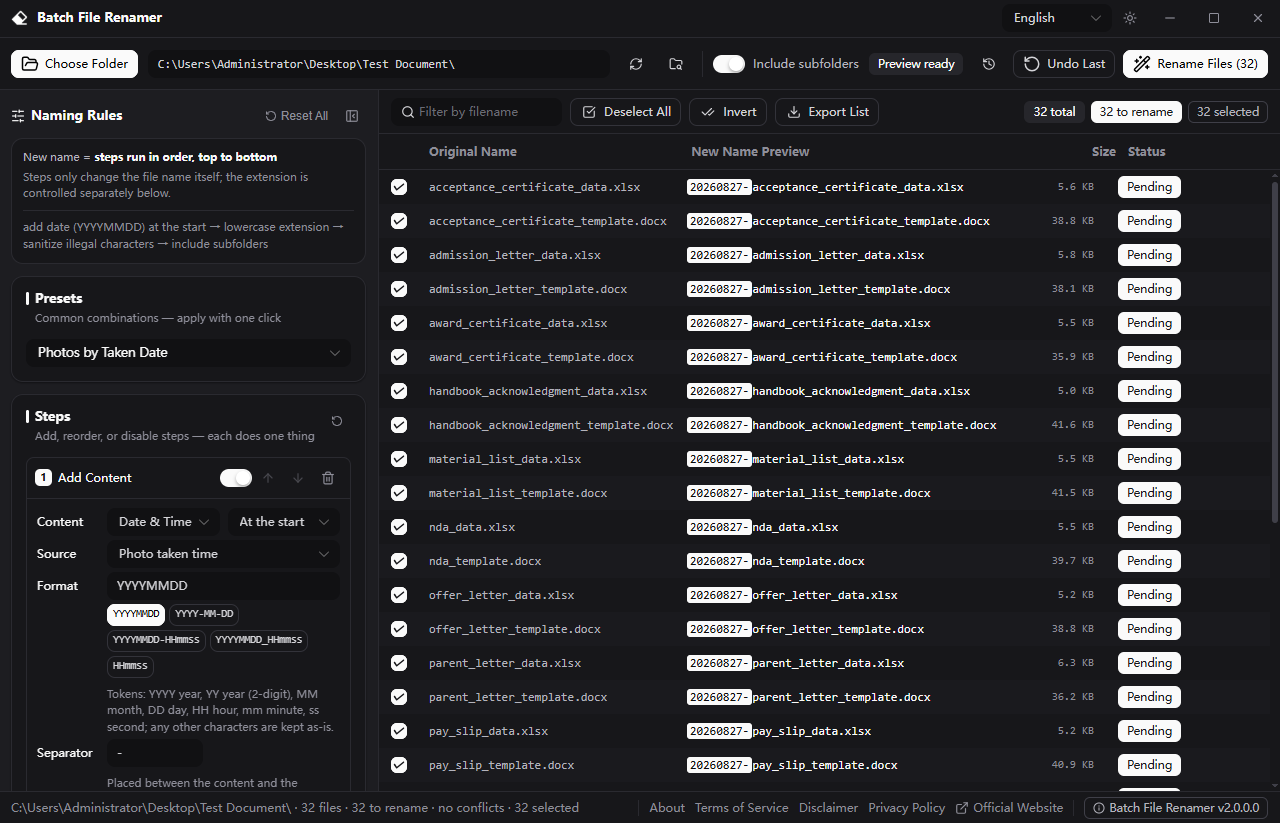
Naming Rules Panel
Stack up to five step types — add, replace, change case, remove characters and rebuild names — each with precise, focused options.
Live Preview Table
See every new file name the moment you type, with name-conflict and invalid-name warnings and character-level diff highlighting.
Presets
Apply ready-made rule combinations in one click, then fine-tune each step to fit your files.
Filter and Selection
Filter by file name and check exactly which files take part — numbering stays continuous with no gaps.
Export Preview List
Export the full original to new name mapping as CSV to review or archive before you commit.
History Timeline and Undo
Review the last 20 batches and restore any of them with one click — the rename history survives app restarts.
Scroll to zoom
Simple, transparent pricing
Start free and upgrade only when it fits your workflow.
Free
For personal use. Everything you need to get started.
- Full core features
- 100% local & private
- Free updates
- Priority email support
Compare plans
| Feature | Free | Pro |
|---|---|---|
| Full core features | ||
| 100% local & private | ||
| Free updates | ||
| Advanced automation | ||
| Priority email support | ||
| Price | $0 |
Version History
Every release documented, so you always know what's new.
- Multi-step naming rules with live preview and conflict detection
- Two-phase safe rename — swaps and chains supported, existing files never overwritten
- Batch undo history that survives app restarts (last 20 batches)
- Streaming scan for large folders, up to 50,000 entries per scan
- Long-path support beyond 260 characters
- Seven UI languages, dark / light themes and global keyboard shortcuts
Frequently asked questions
Everything you need to know about Batch File Renamer.